go-palette
Go library that provides elegant and convenient style definitions using ANSI colors. Fully compatible & wraps the [fmt library](https://pkg.go.dev/fmt) for nice terminal layouts
About go-palette





Elegant and convenient style definitions using ANSI colors.
Fully compatible and wraps the fmt library for nice terminal layouts.
Supported Colors & Formats
Standard colors

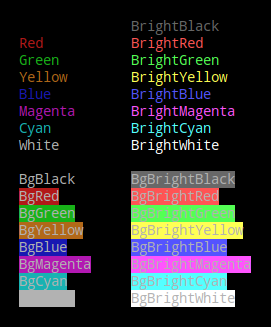
The following colors are supported to be used by their names for both foreground and background as shown in Example using color names
| Color Name | Color Code |
|---|---|
| Black | 0 |
| Red | 1 |
| Green | 2 |
| Yellow | 3 |
| Blue | 4 |
| Magenta | 5 |
| Cyan | 6 |
| White | 7 |
| BrightBlack | 8 |
| BrightRed | 9 |
| BrightGreen | 10 |
| BrightYellow | 11 |
| BrightBlue | 12 |
| BrightMagenta | 13 |
| BrightCyan | 14 |
| BrightWhite | 15 |
Standard colors used as foreground as well as background
Supported Foreground Palette
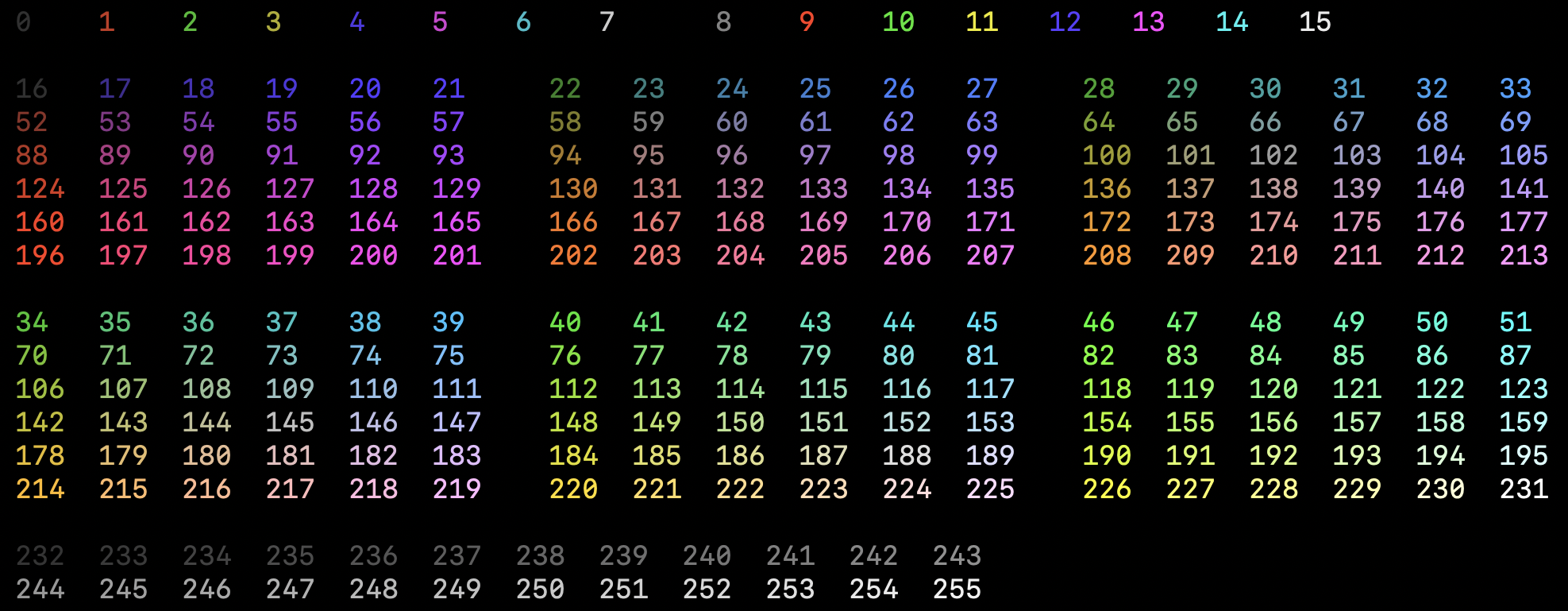
The following palette is supported as foreground/text colors. The numbers represent the color-codes which can be used as shown in Example using color codes.
Supported Background Palette
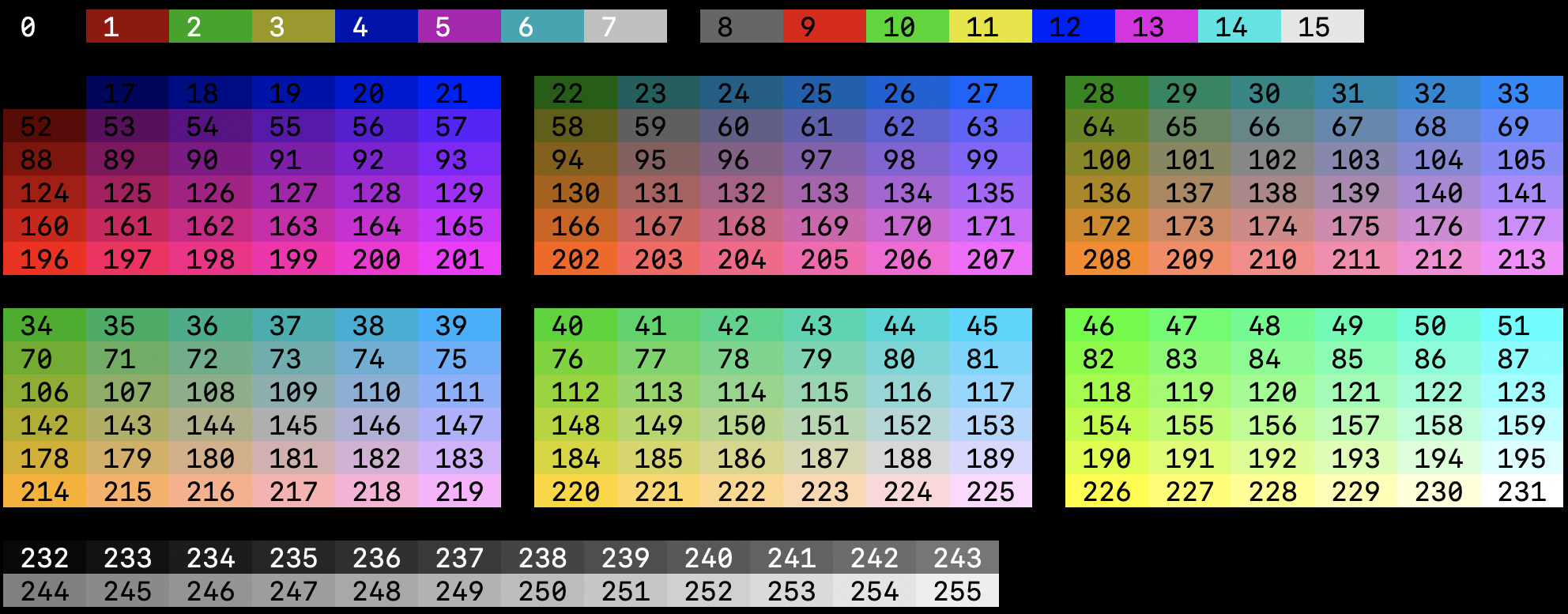
The following palette is supported as background colors. The numbers represent the color-codes which can be used as shown in Example using color codes.
Supported Text Formats
The following text formats are supported.
- Reset
- Bold
- Dim
- Italic
- Underline
- SlowBlink
- Hidden
- Strikethrough

Prerequisites
A go module where you want to integrate go-palette. To create one, follow this guide.
Installation
go get github.com/abusomani/go-palette
Usage
After installing the go-palette package, we start using it the following way.
Import
A very useful feature of Go’s import statement are aliases. A common use case for import aliases is to provide a shorter alternative to a library’s package name.
In this example, we save ourselves having to type palette everytime we want to call one of the library’s functions, we just use pal instead.
import (
    pal "github.com/abusomani/go-palette/palette"
)
Example using Color names
package main

import (
	pal "github.com/abusomani/go-palette/palette"
)

func main() {
	p := pal.New()
	p.Println("This text is going to be in default color.")
	p.SetOptions(pal.WithBackground(pal.Color(pal.BrightYellow)), pal.WithForeground(pal.Black))
	p.Println("This text is going to be in black color with a yellow background.")
}
Output

Example using Color codes
package main

import (
	pal "github.com/abusomani/go-palette/palette"
)

func main() {
	p := pal.New()
	p.Println("This text is going to be in default color.")
	// We can use color codes from the palette to set as foreground and background colors
	p.SetOptions(pal.WithBackground(pal.Color(11)), pal.WithForeground(0))
	p.Println("This text is going to be in black color with a yellow background.")
}
Output
Example using Special effects
package main

import (
	pal "github.com/abusomani/go-palette/palette"
)

func main() {
	p := pal.New(pal.WithSpecialEffects([]pal.Special{pal.Bold}))
	p.Println("Bold")
	p.SetOptions(pal.WithSpecialEffects([]pal.Special{pal.Dim}))
	p.Println("Dim")
	p.SetOptions(pal.WithSpecialEffects([]pal.Special{pal.Italic}))
	p.Println("Italic")
	p.SetOptions(pal.WithSpecialEffects([]pal.Special{pal.Underline}))
	p.Println("Underline")
	p.SetOptions(pal.WithSpecialEffects([]pal.Special{pal.SlowBlink}))
	p.Println("SlowBlink")
	p.SetOptions(pal.WithSpecialEffects([]pal.Special{pal.Hidden}))
	p.Print("Hidden")
	p.SetOptions(pal.WithDefaults())
	p.Println("<-Hidden")
	p.SetOptions(pal.WithSpecialEffects([]pal.Special{pal.Strikethrough}))
	p.Println("Strikethrough")
}
Flush
Flush resets the Palette options with default values and disables the Palette.
package main

import (
	pal "github.com/abusomani/go-palette/palette"
)

func main() {
	p := pal.New()
	p.Println("This text is going to be in default color.")
	// We can use color codes from the palette to set as foreground and background colors
	p.SetOptions(pal.WithBackground(pal.BrightMagenta), pal.WithForeground(pal.Black))
	p.Println("This text is going to be in black color with a bright magenta background.")
	p.Flush()
	p.Println("This text is going to be in default color.")
}
Output

Limitations
Windows
Go-Palette provides ANSI colors only. Windows does not support ANSI out of the box. To toggle the ANSI color support follow the steps listed in this superuser thread.
Different behaviours in special effects
Go-Palette provides styled support using ANSI Color codes through escape sequences. This varies between different Terminals based on its setting. Refer ANSI Escape Codes for more details.
License
Licensed under MIT
Frequently Asked Questions
What is go-palette?
go-palette is a Command Line library for the Go programming language. Go library that provides elegant and convenient style definitions using ANSI colors. Fully compatible & wraps the [fmt library](https://pkg.go.dev/fmt) for nice terminal layouts
How do I install go-palette?
Install go-palette with the Go module system using `go get abusomani/go-palette`. Check the repository for the current installation instructions.
What category does go-palette belong to?
go-palette is listed under Command Line, specifically Advanced Console UIs.