taskctl
Concurrent task runner
About taskctl
This large README is shown as a plain-text preview. Read the full README at the source
<p align="center">
<img width="400" src="https://raw.githubusercontent.com/taskctl/taskctl/main/docs/logo.png" alt="taskctl - developer's routine tasks automation toolkit" title="taskctl - developer's routine tasks automation toolkit" />
</p>
# taskctl - concurrent task runner, developer's routine tasks automation toolkit
[](https://pkg.go.dev/github.com/taskctl/taskctl?tab=doc)





[](https://github.com/taskctl/taskctl/actions/workflows/pull-request-checks.yml)

[](https://goreportcard.com/report/github.com/taskctl/taskctl)
[](https://codecov.io/gh/taskctl/taskctl)
[](https://github.com/taskctl/taskctl/pulls)
A simple, modern alternative to GNU Make. *taskctl* is a concurrent task runner that allows you to design your routine tasks and development pipelines in a nice and neat way in a human-readable format (YAML, JSON or TOML). Given a pipeline (composed of tasks or other pipelines), it builds a graph that outlines the execution plan. Tasks may run concurrently or cascade. Besides pipelines, each single task can be started manually or triggered by the built-in filesystem watcher.
## Features
- human-readable configuration (YAML, JSON or TOML) with local or remote imports
- concurrent task execution with DAG-based pipelines: dependencies, conditions, allowed failures, graph visualization
- cross-platform: embedded shell interpreter, no dependency on a system shell
- AI-agent friendly: JSON discovery, NDJSON run events, non-interactive mode, installable agent skill
- customizable execution contexts (wrap commands in `docker`, `ssh`, any binary)
- templated commands with variables, task variations, and output piped between tasks
- integrated file watcher (live reload)
- output formats: raw, prefixed, live dashboard (`default`), or JSON event stream
- interactive task selector and shell autocomplete
- embeddable task runner for Go programs
```yaml
tasks:
lint:
command:
- golangci-lint run
- go vet ./...
test:
allow_failure: true
command: go test ./...
build:
command: go build -o bin/app ./...
env:
GOOS: linux
GOARCH: amd64
before: rm -rf bin/*
pipelines:
release:
- task: lint
- task: test
- task: build
depends_on: [lint, test]
```
According to this plan, `lint` and `test` will run concurrently, and `build` will start only when both `lint` and `test` have finished.
[](https://asciinema.org/a/326726)
## Contents
- [Getting started](#getting-started)
- [Installation](#install)
- [Usage](#usage)
- [taskctl for AI agents](#taskctl-for-ai-agents)
- [Configuration](#configuration)
- [Global configuration](#global-configuration)
- [Example](#example)
- [Tasks](#tasks)
- [Pass CLI arguments to task](#pass-cli-arguments-to-task)
- [Task's variations](#tasks-variations)
- [Task's variables](#tasks-variables)
- [Storing task's output](#storing-tasks-output)
- [Conditional execution](#task-conditional-execution)
- [Pipelines](#pipelines)
- [Output formats](#taskctl-output-formats)
- [Filesystem watchers](#filesystem-watchers)
- [Patterns](#patterns)
- [Contexts](#contexts)
- [CLI reference](#cli-reference)
- [Embeddable task runner](#embeddable-task-runner)
- [Runner](#runner)
- [Scheduler](#scheduler)
- [Autocomplete](#autocomplete)
- [How to contribute?](#how-to-contribute)
- [License](#license)
## Getting started
### Install
#### macOS
```
brew tap taskctl/taskctl
brew install --cask taskctl
```
#### Linux
```
sudo wget https://github.com/taskctl/taskctl/releases/latest/download/taskctl_linux_amd64 -O /usr/local/bin/taskctl
sudo chmod +x /usr/local/bin/taskctl
```
#### deb/rpm:
Download the .deb or .rpm from the [releases](https://github.com/taskctl/taskctl/releases) page and install with `dpkg -i` and `rpm -i` respectively.
#### Windows
```
scoop bucket add taskctl https://github.com/taskctl/scoop-taskctl.git
scoop install taskctl
```
#### From sources
```
git clone https://github.com/taskctl/taskctl
cd taskctl
go build -o taskctl .
```
#### Docker images
Docker images are available on [Docker Hub](https://hub.docker.com/r/taskctl/taskctl) and [GitHub Container Registry](https://github.com/taskctl/taskctl/pkgs/container/taskctl) (`ghcr.io/taskctl/taskctl`).
### Usage
- `taskctl` - run the interactive task prompt
- `taskctl pipeline1` - run a single pipeline
- `taskctl task1` - run a single task
- `taskctl pipeline1 task1` - run one or more pipelines and/or tasks
- `taskctl watch watcher1 watcher2` - start one or more watchers
## taskctl for AI agents
taskctl has a machine-readable CLI surface designed for use by AI agents and other tooling: JSON discovery documents, an NDJSON event stream for runs, non-interactive execution, and an installable Claude Code skill. A full per-command reference — every command, flag and example — is generated into [`docs/cli/`](docs/cli/taskctl.md), one Markdown page per command, kept in sync with the binary by the `update-docs` task.
### Discovering tasks and pipelines: `--output json list` / `show`
`taskctl --output json list` prints a single `schema_version`-tagged JSON document describing every task, pipeline, context and watcher in the config. `taskctl --output json show <name>` prints the full detail for a single task (resolved commands, env, variables, `allow_failure`) or pipeline (its stages, sorted by name for stability — each with its task, or `pipeline` for a nested sub-pipeline, plus dependencies and conditions). See [`docs/cli/`](docs/cli/taskctl.md) for the per-command reference.
### Streaming run events: `--output json`
Running with `--output json` switches the run's output to newline-delimited JSON (NDJSON) — one event object per line — instead of human-oriented text, so an agent can parse progress and results without screen-scraping. The target is passed directly, with no `run` keyword. The stream is:
| event | key fields |
|---|---|
| `run_started` | `schema_version`, `targets` |
| `task_started` | `task` |
| `task_output` | `task`, `stream` (`stdout`/`stderr`), `data` |
| `task_finished` | `task`, `status` (`done`/`failed`/`skipped`), `exit_code`, `duration_ms`, `error` (on failure) |
| `run_finished` | `status` (`done`/`failed`), `duration_ms`, `tasks` (array of `{task, status (done/failed/skipped/canceled), exit_code, duration_ms}`), `error` (on failure) |
### Validating config: `--output json validate`
`taskctl validate <config-file>` also honors `--output json`, emitting a single `schema_version`-tagged document (with `valid`, `file` and `error` fields; `error` is present only when `valid` is `false`) instead of the human `✓`/`✗` line. Invalid config exits non-zero.
### Non-interactive execution: `--no-input`
By default taskctl may prompt interactively (e.g. for confirmation or input tasks). Non-interactive mode disables all of that, and is enabled whenever either of the following is true:
- `--no-input` is passed, or the `TASKCTL_NO_INPUT` environment variable is set
- output format is `json`
A non-TTY stdin (e.g. a pipe or an agent harness) does *not* by itself enable non-interactive mode — prompts still run in accessible, line-based mode against the pipe. It only affects the no-target case: when you run `taskctl` with no task or pipeline, the interactive selector requires a TTY, so on a non-TTY stdin taskctl errors with guidance instead of blocking. Pass `--no-input` (or `--output json`) to suppress prompts explicitly.
Separately, the `default` live dashboard (the default format on a TTY) requires an interactive stdout; if stdout is not a TTY, taskctl automatically degrades it to `prefixed` output instead of failing.
### Claude Code skill: `taskctl skill install`
`taskctl skill install` writes a Claude Code skill (`SKILL.md`) that teaches an agent how to use taskctl's JSON surface, into `.claude/skills/taskctl/SKILL.md` in the current directory.
- `--global` installs into the user's home directory instead of the current directory.
- `--force` overwrites an existing installation.
## Configuration
*taskctl* uses a config file (`tasks.yaml` or `taskctl.yaml`) where your tasks and pipelines are stored. The config file includes the following sections:
- tasks
- pipelines
- watchers
- contexts
- variables
A config file may import other config files, directories or URLs.
```yaml
import:
- .tasks/database.yaml
- .tasks/lint/
- https://raw.githubusercontent.com/taskctl/taskctl/main/docs/example.yaml
```
### Example
Config file [example](https://github.com/taskctl/taskctl/blob/main/docs/example.yaml)
### Global configuration
*taskctl* has a global configuration stored in the ``$HOME/.taskctl/config.yaml`` file. It is handy for storing system-wide tasks, reusable contexts, defaults, etc.
## Tasks
A task is the foundation of *taskctl*. It describes one or more commands to run, their environment, executors and attributes such as the working directory, execution timeout, acceptance of failure, etc.
```yaml
tasks:
lint:
allow_failure: true
command:
- golint $(go list ./... | grep -v /vendor/)
- go vet $(go list ./... | grep -v /vendor/)
build:
command: go build ./...
env:
GOOS: linux
GOARCH: amd64
env_file: /data/.env
after: rm -rf tmp/*
variations:
- GOARCH: amd64
- GOARCH: arm
GOARM: 7
```
A task definition takes the following parameters:
- `command` - one or more commands to run
- `description` - human-readable description, shown by `taskctl list` and `taskctl show`
- `variations` - list of variations (env variables) to apply to command
- `context` - execution context's name
- `env` - environment variables. All existing environment variables will be passed automatically
- `env_file` - env file in `k=v` format to read variables from
- `dir` - working directory. Current working directory by default
- `timeout` - command execution timeout (default: none)
- `allow_failure` - if set to `true`, failed commands will not interrupt execution (default: `false`)
- `after` - command that will be executed after the task completes
- `before` - command that will be executed before the task starts
- `exportAs` - name of the env variable that receives the task's stdout; when omitted, the output is not exported to the environment (it remains available via `.Tasks.<Name>.Stdout`)
- `condition` - condition to check before running task
- `variables` - task's variables
- `interactive` - if `true` provides STDIN to commands (default: `false`)
### Tasks variables
Each task, stage and context has variables that are used to render a task's fields - `command`, `dir`, `before`, `after`. Along with the globally predefined ones, variables can be set in a task's definition. You can use those variables according to the `text/template` [documentation](https://pkg.go.dev/text/template).
Variables layer by precedence, last wins: global < context < task. So a variable declared under a context's `variables:` is available in the `command`, `dir`, `before` and `after` of any task using that context, and a task-level variable of the same name overrides it. A task's `condition:` is rendered with the same merged variables — global, context, task, and the predefined ones below — as its commands.
Predefined variables are:
- `.Root` - root config file directory
- `.Dir` - config file directory (same as `.Root`)
- `.TempDir` - system's temporary directory
- `.Args` - provided arguments as a string
- `.ArgsList` - array of provided arguments
- `.Output` - previous command's output
- `.Task` - the running task's static metadata: `.Task.Name`, `.Task.Description`, `.Task.Dir`, `.Task.Context`, `.Task.Condition`, `.Task.Timeout`, `.Task.AllowFailure`, `.Task.Interactive`, `.Task.ExportAs`
- `.Context` - the resolved execution context: `.Context.Name`, `.Context.Dir`, `.Context.Executable` (with `.Context.Executable.Bin` and `.Context.Executable.Args`; `.Context.Executable` is nil when the context sets no executable)
- `.Stage` - when the task runs inside a pipeline stage: `.Stage.Name`, `.Stage.Condition`, `.Stage.Dir`, `.Stage.AllowFailure`, `.Stage.DependsOn`
- `.Tasks.<Name>` - results of an already-completed task, visible across the whole run: `.Tasks.<Name>.Stdout`, `.Tasks.<Name>.Stderr`, `.Tasks.<Name>.ExitCode`. `<Name>` is title-cased, so task `producer` is `.Tasks.Producer.Stdout`. A name containing a dash can't use field syntax (`{{ .Tasks.Build-Host.Stdout }}` fails to parse) - use `{{ (index .Tasks "Build-Host").Stdout }}` instead
Variables can be used inside task definition. For example:
```yaml
tasks:
task1:
dir: "{{ .Root }}/some-dir"
command:
- echo "My name is {{ .Task.Name }}"
- echo {{ .Output }} # My name is task1
- echo "Sleep for {{ .sleep }} seconds"
- sleep {{ .sleep | default 10 }}
- sleep {{ .sleep }}
variables:
sleep: 3
```
### Pass CLI arguments to task
Any command line arguments succeeding `--` are passed to each task via the `.Args` and `.ArgsList` variables or the `TASKCTL__ARGS` environment variable.
Given this definition:
```yaml
lint1:
command: go lint {{.Args}}
lint2:
command: go lint {{index .ArgsList 1}}
```
the resulting command is:
```
$ taskctl lint1 -- package.go
# go lint package.go
$ taskctl lint2 -- package.go main.go
# go lint main.go
```
### Storing task's output
A task's stdout is automatically stored in the ``.Tasks.<Name>.Stdout`` variable (alongside ``.Tasks.<Name>.Stderr`` and ``.Tasks.<Name>.ExitCode``), where `<Name>` is the task's title-cased name. Results accumulate in a run-wide map, so a task sees any task that finished before it started; a stage that `depends_on` the producer is guaranteed to see its result. The stdout is exported to an environment variable only if the task sets `exportAs`, in which case it is written verbatim to the env var of that name; with no `exportAs` there is no environment export.
### Tasks variations
A task may run in one or more variations. Variations allow you to reuse a task with different env variables:
```yaml
tasks:
build:
command:
- GOOS=${GOOS} GOARCH=amd64 go build -o bin/taskctl_${GOOS} ./cmd/taskctl
env:
GOFLAGS: -ldflags=-s -ldflags=-w
variations:
- GOOS: linux
- GOOS: darwin
- GOOS: windows
```
This config will run the build 3 times, each with a different `GOOS`.
### Task conditional execution
The following task will run only when there are any changes that are staged but not committed:
```yaml
tasks:
build:
command:
- ...build...
condition: git diff --exit-code
```
## Pipelines
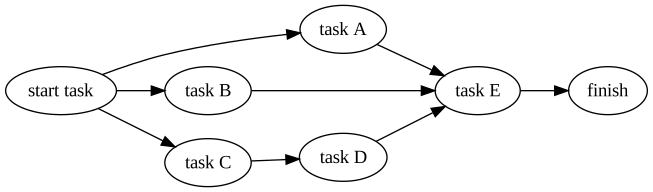
A pipeline is a set of stages (tasks or other pipelines) to be executed in a certain order. Stages may be executed in parallel or one-by-one. A stage may override the task's environment, variables, etc.
This pipeline:
```yaml
pipelines:
pipeline1:
- task: start task
- task: task A
depends_on: "start task"
- task: task B
depends_on: "start task"
- task: task C
depends_on: "start task"
- task: task D
depends_on: "task C"
- task: task E
depends_on: ["task A", "task B", "task D"]
- task: finish
depends_on: ["task E"]
```
will result in an execution plan like this:
A stage definition takes the following parameters:
- `name` - stage name. If not set, the referenced task or pipeline name will be used.
- `task` - task to execute on this stage
- `pipeline` - pipeline to execute on this stage
- `env` - environment variables. All existing environment variables will be passed automatically
- `env_file` - file with env variables in `k=v` format to read variables from
- `dir` - working directory override for the task run in this stage
- `depends_on` - names of the stages this stage depends on. This stage will be started only after the referenced stages have completed.
- `allow_failure` - if `true`, a failing stage will not interrupt pipeline execution. ``false`` by default
- `condition` - condition to check before running stage
- `variables` - stage's variables
## Taskctl output formats
Taskctl has several output formats:
- `raw` - prints raw commands output
- `prefixed` - strips ANSI escape sequences where possible, prefixes command output with task's name
- `default` - live dashboard (the default on a TTY): a spinner, name and elapsed time per running task, each with its latest output line; downgrades to `prefixed` when stdout is not a TTY
- `json` - newline-delimited JSON event stream for machine consumption (see [taskctl for AI agents](#taskctl-for-ai-agents))
## Filesystem watchers
A watcher watches for changes in files selected by the provided patterns and triggers the task any time an event occurs.
```yaml
watchers:
watcher1:
watch: ["README.*", "pkg/**/*.go"] # Files to watch
exclude: ["pkg/excluded.go", "pkg/excluded-dir/*"] # Exclude patterns
events: [create, write, remove, rename, chmod] # Filesystem events to listen to
task: task1 # Task to run when event occurs
```
A watcher definition takes the following parameters:
- `watch` - patterns of files to watch
- `exclude` - patterns of files to exclude
- `events` - filesystem events to listen to (`create`, `write`, `remove`, `rename`, `chmod`)
- `task` - task to run when an event occurs
- `variables` - watcher's variables, passed to the task
### Patterns
Thanks to [doublestar](https://github.com/bmatcuk/doublestar) *taskctl* supports the following special terms within include and exclude patterns:
| Special Terms | Meaning |
|---|---|
| `*` | matches any sequence of non-path-separators |
| `**` | matches any sequence of characters, including path separators |
| `?` | matches any single non-path-separator character |
| `[class]` | matches any single non-path-separator character against a class of characters ([details](https://github.com/bmatcuk/doublestar/blob/master/README.md#character-classes)) |
| `{alt1,...}` | matches a sequence of characters if one of the comma-separated alternatives matches |
Any character with a special meaning can be escaped with a backslash (`\`).
## Contexts
Contexts allow you to set up the execution environment, variables, the binary that will run your task, up/down commands, etc.
```yaml
contexts:
local:
executable:
bin: /bin/zsh
args:
- -c
env:
VAR_NAME: VAR_VALUE
variables:
sleep: 10
quote: "'" # will quote command with provided symbol: "/bin/zsh -c 'echo 1'"
before: echo "I'm local context!"
after: echo "Have a nice day!"
```
A context definition takes the following parameters:
- `dir` - working directory. Also the base for a relative `env_file` path
- `executable` - binary (`bin`) and its arguments (`args`) that will run the task's commandsFrequently Asked Questions
What is taskctl?
taskctl is a Build Automation library for the Go programming language. Concurrent task runner
How do I install taskctl?
Install taskctl with the Go module system using `go get taskctl/taskctl`. Check the repository for the current installation instructions.
What category does taskctl belong to?
taskctl is listed under Build Automation, specifically Build Automation.